Synthesis AG - SyncML Client and Server Solutions

SyncML Clients for PDA

Synthesis SyncML Clients for PDA bring SyncML compatibility to mobile devices of widespread mobile OS platforms like PalmOS and Windows Mobile (PocketPC/MS-Smartphone).
This allows mobile over-the-air (OTA) synchronisation with any compliant SyncML server (such as Toffa.com SyncWise, Oracle Collaboration Suite, Open-Xchange, Teamware, eGroupware, DeskNow, ScheduleWorld.com, cixonline.com, neopim.com, goosync.com and many many more)

Free evaluation during 30 days:

  • Free period starts automatically after the first installation on the device
  • License for unlimited later use can be purchased on-line
Please Note:
  • Oracle OCS Users please note that OCS supports the 3.0 client officially only after OCS patch 6142705 / Oracle Calendar Application System Patch 10.1.2.4.2. is installed. For OCS systems which do not have this patch installed yet, you can still use 3.0 clients, but with minor degradation in the way all-day events and attendees are handled. Alternatively, the previous 2.5.0.69 version can be used in the meantime (but requires a purchased license or a demo license - automatic 30 day demo does not work for 2.5.0.69).
  • Before downgrading from 3.x to 2.5 or even 2.1, please make sure you really need to downgrade, because you might loose SyncML client settings in the process (but of course no data). Please make sure you have written down the settings so you can re-enter them if needed
  • When upgrading a PalmOS device from 2.5 to 3.0, a slow sync will occur first. This is completely normal.

Features (Version 3.0):

  • Mobile synchronisation using SyncML standard (all OMA-DS 1.2, 1.1 and 1.0)
  • Synchronizes via any available internet connection (cable/cradle, modem, WLAN, built-in phone)
  • Stable mobile sync experience through Suspend&Resume support which allows resuming sync after intentional or unintentional interruption.
  • PRO only: True push through Server Alerted Notification (SAN) - the server can initiate a synchronisation when new data is available using a notification binary SMS message
  • Does not interfere with platform's native synchronisation (HotSync, ActiveSync)
  • Synchronizes contacts, events, tasks and (Palm only) notes.
  • PRO only: receive and send email via SyncML, including attachments (for PocketPC/Smartphone, and if server supports it).
  • PRO only: Multiple sync profiles, allows to keep device in sync with more than just a single server.
  • SSL secure connection to server (PocketPC, SmartPhone, PalmOS 5.2 and later)
  • PRO only: automatic scheduled synchronisation always keeps your data up-to-date
  • PRO only: PocketPC/Smartphone: gzip compression saves bandwith for synchronizing large emails.

Variants available

STD (standard version)Synchronisation of contacts, calendar and tasks; secure server connection via SSL/https supported
groupwisesync.comSpecial customized client for use with the GroupWiseSync.com service only
PRO (professional version)Functionality of STD plus additionally
  • synchronisation of emails (including attachments on Windows Mobile)
  • multiple switchable settings profiles for synchronisation with multiple servers
  • AutoSync (automatic scheduled synchronisation - on PalmOS only available in new 3.x client versions)
goosync.comSpecial customized client for use with the GooSync.com service only

Supported platforms

 iPhone OS - Go to Downloads
 Windows Mobile Professional/Classic - PocketPC - Go to Downloads
 Windows Mobile Standard - Smartphone - Go to Downloads
 PalmOS - Go to Downloads
 PocketPC 2002 - Go to Downloads

SyncML Client for Mozilla Sunbird/Lightning

Synthesis SyncML CLients for Mozilla Sunbird/Lightning calendar allows to synchronize data with any compliant SyncML server.

The SyncML client for Mozilla Sunbird/Lightning is part of the Synthesis SyncML SDK, where it is included in source code for different platforms (see SDK downloads). As it is of general use also without the SDK, it is available separately as pre-built binary.

This is a sample application. Its main use is showing how to directly interface with complex SQLite3 databases by just using the power of the SyncML engine's XML configuration as well as how to write a custom SyncML application.

The SyncML client for Mozilla Sunbird/Lightning is available under the Synthesis DEMO Application license terms - at no cost for non-commercial use.

Supported platforms

 Windows - Go to Downloads
 Mac OS X Universal Binary - Go to Downloads

SyncML Clients for MS Outlook

Synthesis SyncML CLients for Outlook allows to synchronize data from Outlook or Outlook Express with any compliant SyncML server (such as space2go.com enterprise2go, Toffa.com SyncWiseEnterprise, Oracle Collaboration Suite, Open-Xchange any many more)

Variants available

STD (CONTACTS ONLY)Synchronisation of contacts for Outlook and Outlook Express

Supported platforms

 Windows - Go to Downloads

SyncML Client Dektop DEMO/ODBC/Plugin

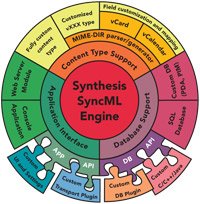
Synthesis SyncML Clients are designed to add SyncML synchronisation to existing applications with a minimum effort, and thus making them instantly compatible with any CRM, Groupware System and other application which supports SyncML.

Synthesis SyncML Clients can be directly integrated with existing SQL based applications via the ODBC by simply editing a single XML configuration file, or alternatively by writing custom database adaptor plugins in C, C++ or Java.
ODBC/SQL based and plugin based data sources can be mixed in a single setup.

Variants available

DEMOThe Demo versions of Synthesis SyncML Products are available at no cost

They feature exactly the same fully functional SyncML implementation as in the STD and PRO products, so they are very well suitable for compatibility tests and experiments.
DEMO versions are restricted to a simple, text file based database format, while the full versions (STD and PRO) have SQL/ODBC and custom plugin database integration capabilities.
DEMO versions are standalone, console applications (while STD and PRO servers are also available as plugin modules for Apache or IIS)

PRO (professional version)Functionality of STD plus
  • Support for plugin database adaptors, which can be written in C/C++/JAVA using our Plugin SDK
  • Built-in scripting language (C/JavaScript like) for flexible field mapping, extended filtering, custom actions on various events
  • Support for email data type including attachments
  • Support for SyncML TAF filtering and Synthesis extended filtering - Clients can specify filtering expressions in the database path to restrict the sync set
  • Support for Master/Detail mapping in SQL databases

Supported platforms

 Windows - Go to Downloads
 Linux for x86 - Go to Downloads
 Mac OS X Universal Binary - Go to Downloads